
Facebook Ads is a paid advertising platform that allows businesses to create targeted ads and show them to specific audiences across Meta platforms.
Unlike traditional advertising, Facebook Ads allows you to:
- Target specific age groups, locations, and interests
- Set your own budget
- Track ad performance in real-time
- Retarget users who visited your website
- Generate leads, sales, traffic, and brand awareness
Types of Facebook Ads
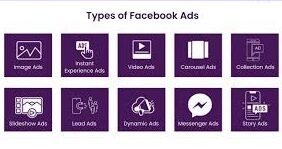
Facebook offers multiple ad formats depending on your marketing goal. Below are the most common types:
- 1. Image Ads – Simple ads with a single image and text.
Best for: Brand awareness and simple promotions. - 2. Video Ads – Ads that use video content to promote products or services.
Best for: Engagement, storytelling, and product demonstrations. - 3. Carousel Ads – Allows you to display multiple images or videos in one ad.
Best for: Showcasing multiple products or features. - 4. Slideshow Ads – Lightweight video ads created from images.
Best for: Low internet speed audiences. - 5. Lead Generation Ads – Designed to collect user information directly on Facebook
Best for: Capturing leads without sending users to a website.
Steps to create facebook Ads:
1.Create a Meta Business Manager Account
Set up a Business Manager account to manage your ads, pages, and payment methods in one place.
2. Connect Your Facebook Page
Your ads must run from a Facebook Page, not a personal profile.
3.Set Up an Ad Account
Choose your currency, time zone, and add a payment method (card or online payment).
4. Choose Campaign Objective
Select your goal such as Awareness, Traffic, Leads, Engagement, or Sales. This tells Facebook how to optimize your ad.
5. Define Target Audience
Choose who should see your ad based on age, location, gender, interests, and behaviors
6. Set Your Budget
Decide how much you want to spend daily or for the entire campaign.
7. Select Ad Placements
Choose where your ads appear (Facebook Feed, Instagram, Stories, Reels, etc.) or use automatic placements.
8. Create Ad Creative
Upload images or videos that attract attention and match your marketing goal.
9.Write Ad Copy
Add clear, persuasive text explaining your offer and benefits.
10. Add Call-to-Action (CTA)
Include a strong button like “Shop Now,” “Learn More,” or “Sign Up.
11. Review and Publish
Check your ad preview and confirm everything before publishing.
12. Monitor Performance
Track metrics like clicks, cost per click, leads, or sales.